
EUDI Wallet
The European Digital Identity Wallet (EUDI Wallet) is an identity app that every EU member state must offer its citizens under eIDAS 2.0. In eID Hub, it is the provider eudiw and supports authentication. You ask for specific claims with a DCQL query, the user shares them from their wallet, and eID Hub verifies them and returns them to you as JSON.
You use eudiw through the REST API, either on its own or as one of the choices in Multi-Auth Selection. It is not available through the OpenID Connect integration for now.
For what the EUDI Wallet is, the dates that matter and which businesses must accept it, see EUDI Wallet on scrive.com.
The EUDI Wallet provider is experimental. For now you can only use it on Testbed, and the API may still change in ways that need changes to your integration.
Wallets you can test
| Wallet | Issued by | Status | Ecosystem | Test setup |
|---|---|---|---|---|
| EU reference wallet | European Commission | Available now | internal | EU reference wallet |
| d-you | Germany | Available now | germany | d-you |
| mObywatel | Poland | Being added now | ||
| France Identité | France | Being added now | ||
| IT-Wallet | Italy | Being added now | ||
| AltID | Denmark | Being added now |
To start testing, request EUDI Wallet test access and follow your wallet's section in Testing. To see where every EU and EEA country stands with its own wallet, see the Wallet Tracker.
What eID Hub handles for you
A wallet only shares data with a relying party, the registered organisation asking for it, over OpenID for Verifiable Presentations (OpenID4VP). eID Hub runs that exchange for you. It sends your DCQL query to the wallet with the relying party's access certificate, so the wallet can show the user who is asking. When the user shares, eID Hub checks the response against the credential issuers that the ecosystem trusts and returns the verified claims to you as plain JSON.
eID Hub only holds the data until you have fetched it. It deletes it about a minute after your first read, or after about ten minutes if nobody reads it, as described in Data retention. On Testbed, the relying party is always Scrive, so you can test without a registration of your own.
How a wallet transaction works
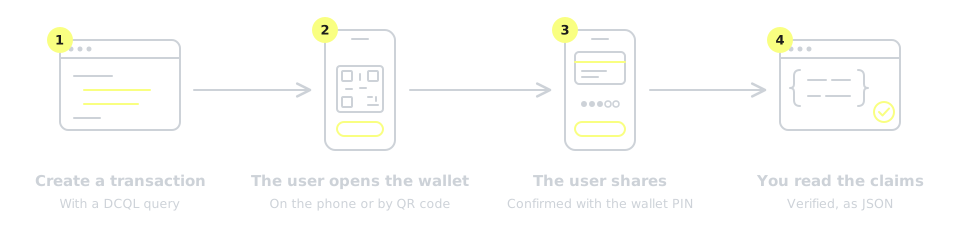
- Create a transaction. Your backend creates an
eudiwtransaction with an ecosystem and a DCQL query listing the claims you need. See Create a transaction. - The user opens the wallet. The user opens
accessUrl. On the phone that has the wallet app, eID Hub's page opens the wallet. On another device, the page shows a QR code that the user scans with that phone. The wallet then shows who is asking and for which claims. See Flow. - The user shares. The user confirms with their wallet PIN, and the wallet shares only the claims you asked for. eID Hub's page then redirects to your
redirectUrl. - You read the claims. When the transaction is complete, fetch it and read the verified claims in
walletResponse. See Completion data.
Key terms
| Term | Meaning |
|---|---|
| PID | Person identification data. The core identity credential in every EUDI Wallet, with claims such as name and date of birth, issued under the member state's authority. |
| Credential and claim | A credential is a signed set of data in the wallet, such as the PID. A claim is one piece of data in it, such as birthdate. |
| DCQL | Digital Credentials Query Language, defined in OpenID4VP. You use it to tell the wallet which credentials and claims to share. |
| Selective disclosure | The wallet shares only the claims you ask for. You can check that someone is 18 or older without seeing their date of birth. |
| Ecosystem | The eID Hub parameter that sets which relying party credentials eID Hub uses and which credential issuers it trusts. Each wallet belongs to one ecosystem. |
| Relying party | The organisation that asks the wallet for data. It must be registered and identifies itself to the wallet with an access certificate. |
| SD-JWT VC and mdoc | The two credential formats EUDI Wallets use. Which ones you can request depends on the wallet. |
| Same-device and cross-device flow | In a same-device flow, the user opens the wallet on the phone they are already using. In a cross-device flow, they scan a QR code with the phone that has the wallet. Which flows work depends on the wallet. |
Going to Production
Each wallet will become available in Production in eID Hub once it is ready for production use. Until then, you can build and test your integration on Testbed.
In Production, you request data as your own relying party, registered in the member state where you are established. Your registration declares which data you intend to request, and you cannot ask for more than you registered. eID Hub acts as an intermediary on your behalf. For the deadlines and which businesses must accept the wallet, see EUDI Wallet on scrive.com.
In this section
- Usage: create a transaction with a DCQL query, read the shared data and handle errors.
- Testing: get test access, set up a wallet's test app and run a test transaction.
- Wallet Tracker: where each EU and EEA country stands with its EUDI Wallet.